RELATED TAGS Registration, setup, installing gitea
QUESTIONS
How can I access the rokojori community server?
LINKS -Account Registration
Register on the community gitea website and wait to be accepted.
Note: I will accept this manually and I will have to know you.
SSH Key Creation Create a SSH key, if you don't have it already.
Ensure that you have 2 parts of the key, one ending with/containing the word 'public' in its
name and an other part (this is the private part).
Copy Public Part of SSH Key
Open the public part of the key in a coding text editor like VS Code (or NotePad, TextEdit etc.) .
You will see a bunch of numbers, usually ending with your device name. Select all the characters and copy them into the clipboard.
Usually you press
CTRL + C
on PC, or on a Mac
COMMAND + C Add SSH Key To Account
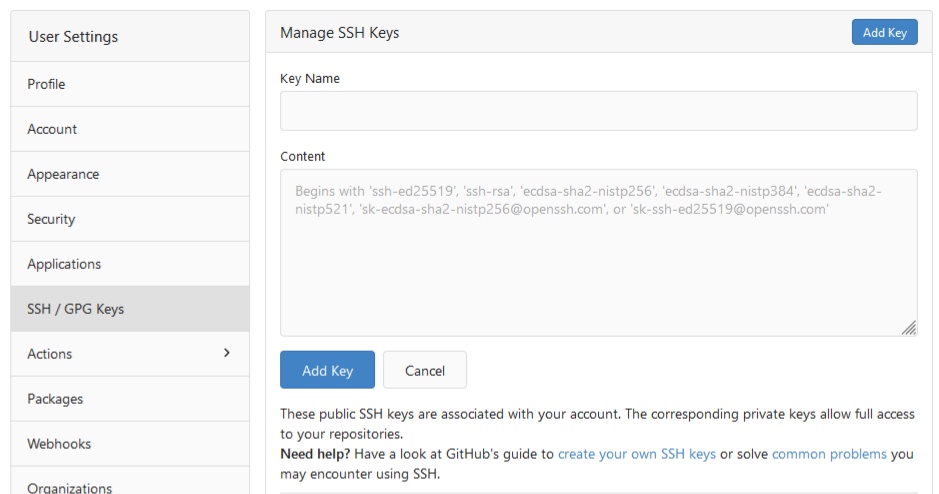
Log in and navigate to the SSH Keys Settings of the gitea website.
Click "Add Key" on the top and paste the public part of your SSH key into the content part with:
Usually you press
CTRL + V
on PC, or on a Mac
COMMAND + V
The key name is not important but it's typically the name of your device (my-pc, old-laptop).
Press the button "Add Key" below the input the complete it.
Git Install git, if you don't have it already.
If you installed git freshly, you need to set your user info.
Ready For Testing
You have now setup everything and you are now ready for testing by cloning (downloading) a project.
APP | VERSION Gitea
RELATED TAGS Registration, setup, installing gitea
QUESTIONS
How can I access the rokojori community server?


 NEWS
NEWS
 STORE
STORE
 TUTORIALS
 GITEA SERVER




 NEWSLETTER